Enterprise and higher
Background Service
Run a watch profile without an active desktop session.
How to
- Prepare a watch profile and verify the service account can access its libraries and source files.
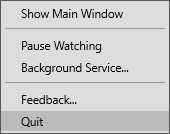
- Choose Background Service from the FileHamster tray or menu-bar menu.
- Use the service controls to install or start the worker, approving operating-system administrator prompts.
- Check the service status and recent activity. Reopen FileHamster to inspect history or manage the worker.
Note: The service uses a Windows Service or macOS LaunchDaemon and requires appropriate permissions.
